Migrate from LaunchDarkly
FlagTGL imports the release behavior behind your flags—not just their names. Connect a LaunchDarkly API access token, preview the migration, sync into FlagTGL, validate in staging, and then move application traffic environment by environment.
LaunchDarkly exposes top-level flag data and an environment map containing targeting configuration through its Feature Flags API. FlagTGL uses that API representation rather than a dashboard export so it can retain ordered rules, context kinds, fallthrough, off variation, and rollout details.
What the sync preserves
- Projects and environments, including critical, confirmation, secure-mode, TTL, comment, and event-tracking settings
- Boolean and multivariate flags, variation values, descriptions, and tags
- Per-environment on/off state and default variation
- Individual targets for every context kind (
user,tenant,organization, and custom kinds) - Targeting rules, percentage rollouts, rollout context/attribute, experiment seeds, salts, prerequisites, and segments
- Flag status, last-requested time, evaluated context kinds, and seven-day evaluation totals
- Client-side and mobile SDK availability
- Temporary/permanent, deprecated, and archived state plus derived lifecycle state such as Ready to archive
- Experiments (including iterations, treatments, allocation, secondary metrics, and analysis configuration), metrics, guarded rollout flag payloads, workflows, and release pipelines
- Approval requests and pending-change instructions, including review policy and scheduled state
- Integration-specific configuration for supported providers, including tags, access metadata, provider values, and capability configuration
Control-plane resources are stored with their complete LaunchDarkly JSON payload as well as normalized fields. This lets beta and provider-specific fields survive a round trip even when FlagTGL does not yet render a dedicated editor for a newly introduced field. Plan- or permission-gated LaunchDarkly endpoints are skipped without blocking the rest of the sync and are reported in server logs.
LaunchDarkly-to-FlagTGL mapping
| LaunchDarkly | FlagTGL | Notes |
|---|---|---|
| Project | Project | Key preserved; name and flag-key convention updated on replay |
| Environment | Environment | Key, name, color, critical/confirmation/comment, secure-mode, TTL, and event defaults preserved |
| Flag kind and variations | Typed flag and variations | Boolean, string, number, and JSON values retain variation order and metadata |
on, offVariation, fallthrough | Environment state, off variation, default rule | Single variation and weighted fallthrough are preserved |
targets and contextTargets | Direct targets | user and custom context kinds are retained |
| Ordered rules and clauses | Ordered targeting rules | Clause operator, values, negation, and context kind are retained |
| Weighted variation rollout | Percentage rollout | Source weight, bucket attribute, context kind, seed, and salt are retained where present |
| Prerequisites | Prerequisites | Flag key and required variation are retained |
| Environment segment | Project segment | Rules, included/excluded targets, and metadata are normalized to FlagTGL's project segment |
| Metrics, experiments, workflows, pipelines, policies | Control-plane resource | Normalized fields plus complete source JSON are retained |
| Approval request | Approval | Review state, instructions, scheduling, and source payload retained |
| Integration configuration | Inactive integration configuration | Retained for review; never automatically activated |
Differences that require review
- Segments are environment-scoped in LaunchDarkly and project-scoped in FlagTGL. If the same segment key has different definitions across LaunchDarkly environments, later imported data updates the single FlagTGL segment. Rename or consolidate those segments before cutover.
- Big Segment membership is external data. The segment definition can be migrated, but external membership stores and synced cohort membership are not copied. Recreate the audience through FlagTGL context attributes or another supported data path.
- LaunchDarkly migration flags are not a separate execution engine in FlagTGL. Their variations and targeting representation can be imported, but LaunchDarkly-specific migration stages, cohort telemetry, and migration-operation reporting require a FlagTGL rollout design.
- Control-plane payload retention is not automatic behavioral parity. Experiments, guarded rollouts, workflows, release policies, and integration settings must be reviewed in FlagTGL before use. Provider-only fields may be visible only in the stored payload.
- Plan- or permission-gated endpoints are best effort. A flag migration can succeed while an experiment, approval, workflow, metric, or integration endpoint is unavailable. Review the report and server logs.
- Change history, members, teams, roles, SSO configuration, service accounts, webhooks, and reusable secrets are not migrated as active resources. Recreate access and retention policy in FlagTGL.
- SDK credentials are regenerated. Existing LaunchDarkly SDK keys are not copied into FlagTGL.
1. Connect LaunchDarkly
In your FlagTGL organization, open Migrations → LaunchDarkly and provide a least-privilege LaunchDarkly API access token. Enter the exact project keys you intend to import. FlagTGL blocks preview and sync while the scope is empty unless Sync every project visible to this token is explicitly selected. FlagTGL stores the token for on-demand sync; disconnect the migration source to remove it.
2. Preview, then sync
Select Preview changes before writing data. The report separates created, updated, unchanged, and failed resources. When the preview matches your intended projects, select Sync now.
Sync is idempotent: rerunning it updates imported resources without intentionally duplicating them. Do not enable Clear existing flags unless you intend to replace FlagTGL-side edits in the selected projects.
3. Verify migration fidelity
For each critical environment, compare:
- variation order and values;
- flag on/off state and default rule;
- individual targets and their context kinds;
- targeting-rule order, operators, and rollouts;
- prerequisites and segments;
- evaluation status and lifecycle badges;
- guarded rollout, experiment, workflow, pipeline, approval, metric, and integration counts in the sync report;
- provider-specific JSON in Integration configurations;
- any same-key segment whose definition differs between environments;
- Big Segments, synced cohorts, migration flags, and plan-gated resources.
After SDK traffic is pointed at FlagTGL, Context explorer and Live events are populated directly from LaunchDarkly-compatible server, browser, and mobile analytics payloads, including multi-context events.
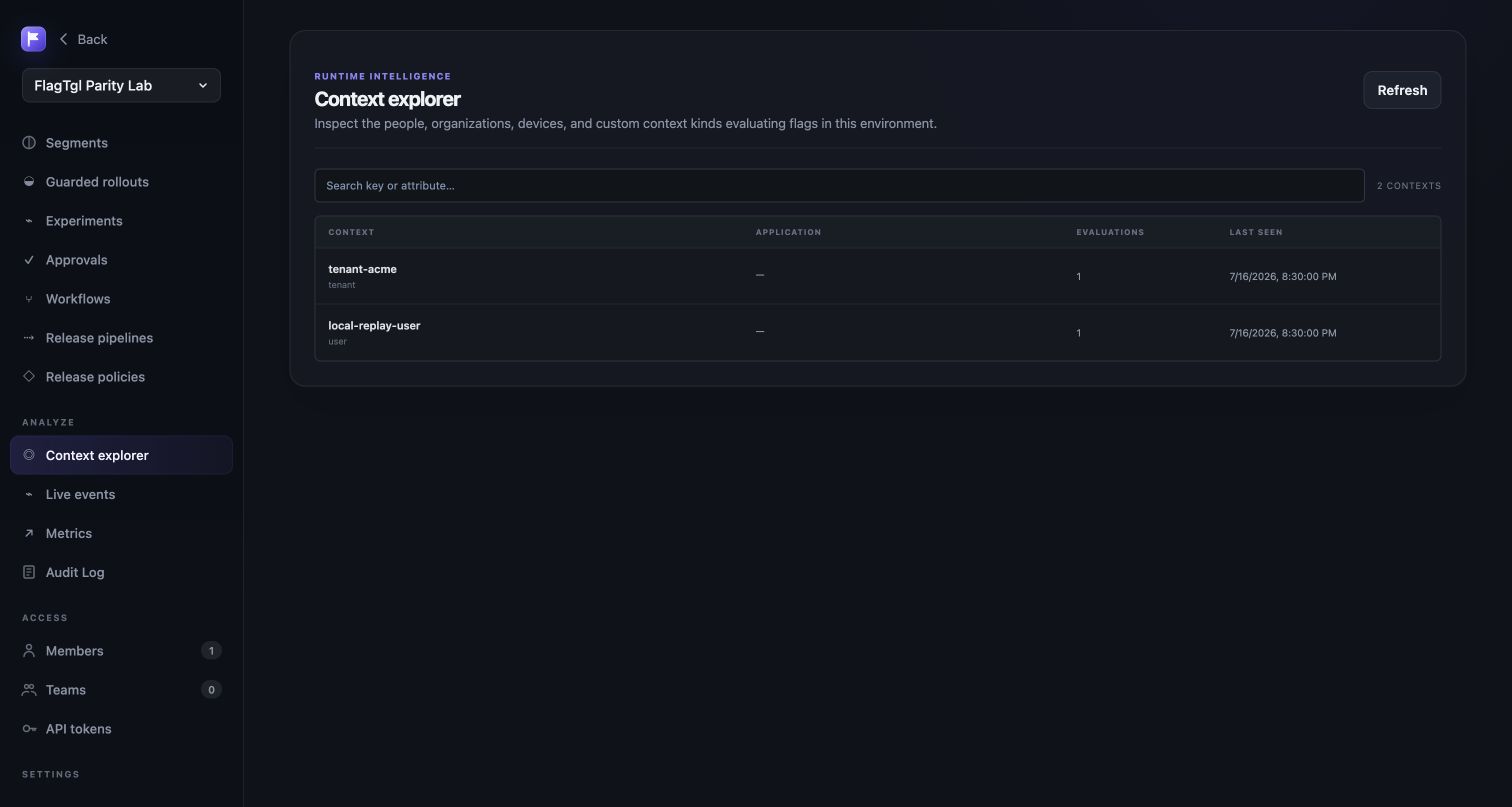
Use representative contexts to evaluate high-impact flags before moving traffic.
4. Point existing SDKs to FlagTGL
Keep your LaunchDarkly SDK where supported, replace its environment credential with the FlagTGL SDK key, and configure streaming, polling, and events endpoints for your FlagTGL deployment. See LD-compatible endpoints.
Compatibility does not remove the need for a staged rollout. Confirm the exact SDK and version you use against the documented endpoints, then compare source and FlagTGL evaluations before switching production traffic.
Permanent replay test
The live trial validation is captured as a credential-free integration fixture at backend/internal/api/testdata/launchdarkly-parity-replay.json. It records the dedicated FlagTgl Parity Lab project and labels each object as either live-observed or representative plan-gated data. No access token, SDK credential, member email, or reusable endpoint secret is stored.
Run the permanent contract with:
cd backend
go test ./internal/api -run TestLaunchDarklyParityReplay -count=1
The test starts from a blank SQLite database and uses the same public HTTP routes as a customer:
- Creates a new customer account and organization.
- Connects to a deterministic LaunchDarkly-compatible HTTP server.
- Runs a dry-run preview.
- Imports projects, environments, flags, targeting, segments, metrics, experiments, workflows, guarded rollouts, pipelines, policies, approval requests, and integration configuration.
- Runs the same sync again and asserts that provider objects are updated in place rather than duplicated.
- Exercises a native approval through review and apply.
- Sends a multi-context LaunchDarkly-compatible analytics event and verifies Context Explorer and Live Events.
This replay remains available after the LaunchDarkly trial expires and is safe for CI because it makes no external network calls.
Move development or staging first. Observe evaluations and API traffic, then repeat for UAT and production. Keep the LaunchDarkly migration source connected until the production comparison is complete.
5. Archive safely
FlagTGL shows lifecycle and per-environment status imported from LaunchDarkly. A Ready to archive badge is a review signal, not an automatic deletion. Archiving retires the flag from SDK delivery while keeping its configuration available for audit and restoration.
Need help with a complex migration? Contact [email protected].